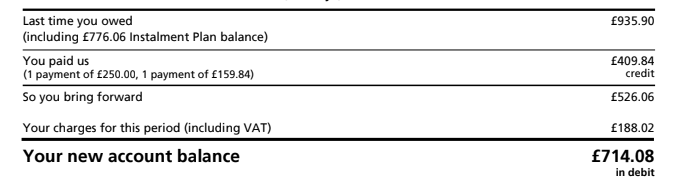
Gas and electricity suppliers often require customers to pay a set amount per month. An invoice is then sent out monthly or quarterly to show the energy usage, payments made on account in the period, and the account balance. An example of an electricity bill extract is shown below:
Often businesses will post the monthly payments as a ‘spend money’ transaction in Xero. However, this approach does not recognise the correct energy cost, VAT or liability to the supplier for a given period or date.
For the above example, posting the payments as ‘spend money’ transactions would result in an electricity charge including VAT in the period of £409.84, whereas the actual charges were only £188.02. The difference relates to electricity charges which should have been recognised in a previous period. The VAT claim will also be incorrect at £19.50 compared to £8.95, and the VAT claimed will not match back to the supplier invoice.
Instead, therefore, electricity bills should be posted to Xero, either directly or via Dext, in order to recognise the correct electricity cost in the month. In this case an electricity charge of £179.07 is posted with VAT of £8.95 to match the supplier charges of £188.02.
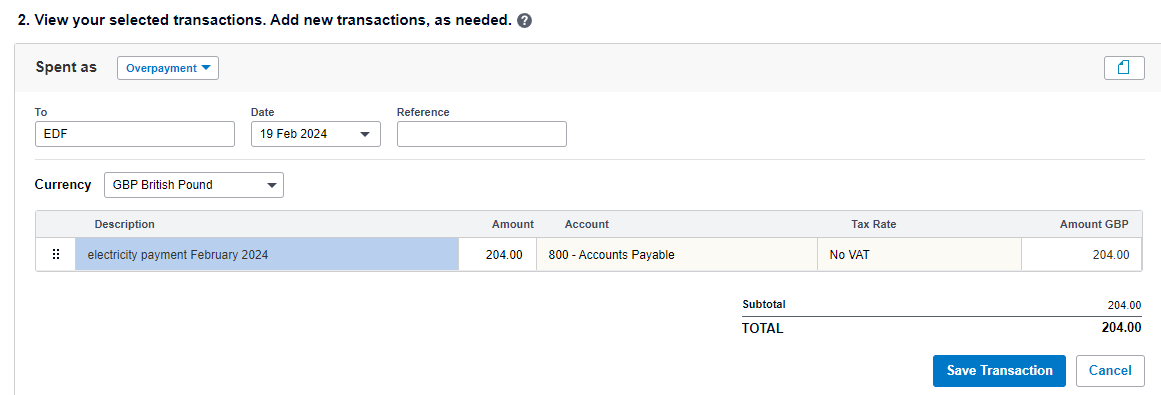
Future fixed payments are then posted to the supplier account as an overpayment.
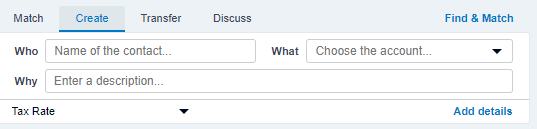
In Xero bank reconciliation select create, and then ‘Add Details’
In the ‘view your selected transactions box’ which opens up, in the dropdown box at the top left ‘spent as’ select ‘ overpayment’, add in the details and save the transaction.
The overpayment can then be allocated against the bills on the account to leave a balance on the contact’s account.
The balance on the contact should be regularly reconciled against the balance on the supplier statements,
If you need help with this, or with other advice, then please get in touch with our accounting team.