This usually involves a single transfer from the bank account that covers payments due on two separate credit cards. The total amount is split and allocated to each card based on their outstanding balances or required payments.
What posting steps do we need to perform in Xero?
Imagine we transfer £3,500.00 from the bank account, which covers a payment of £2,000.00 for Credit Card 1 and £1,500.00 to cover expenses on Credit Card 2.
First, we need to reconcile the £2,000.00 payment for Credit Card 1:
- Go to Accounting → Bank Account → Credit Card 1.
- Select the £2,000.00 received, click Transfer, and choose the bank account from which the money was transferred.
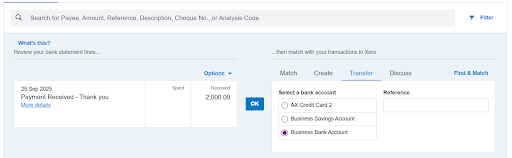
Second, we need to do the same and reconcile the £1500.00 payment for Credit Card 2.
- Go to Accounting → Bank Account → Credit Card 1.
Select the £1500.00 received, click Transfer, and choose the bank account from which the money was transferred.
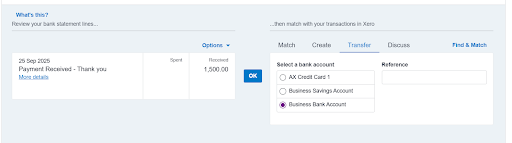
Finally, we need to reconcile the transfer in the bank account:
- Go to Accounting → Bank Account and locate the transaction for £3,500.00.
-
- Click Find and Match. Search for £2,000.00 and select it, then search for £1,500.00 and select it as well.
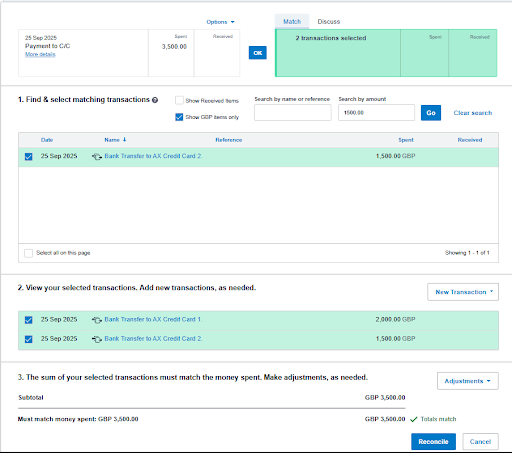
Both transactions will then be matched with the £3,500.00 transfer you made.
Read our full guide on accounting for value added tax (VAT) to learn more.
If you need help with this, or with other advice, then please get in touch with our accounting team.